Software for snow removal, commercial cleaning, and any recurring site work Every stop planned. Every run proven.

Tourstein runs your whole field operation. Plan tours on the map, dispatch crews with vehicles and time windows, and see what actually happened at every stop.

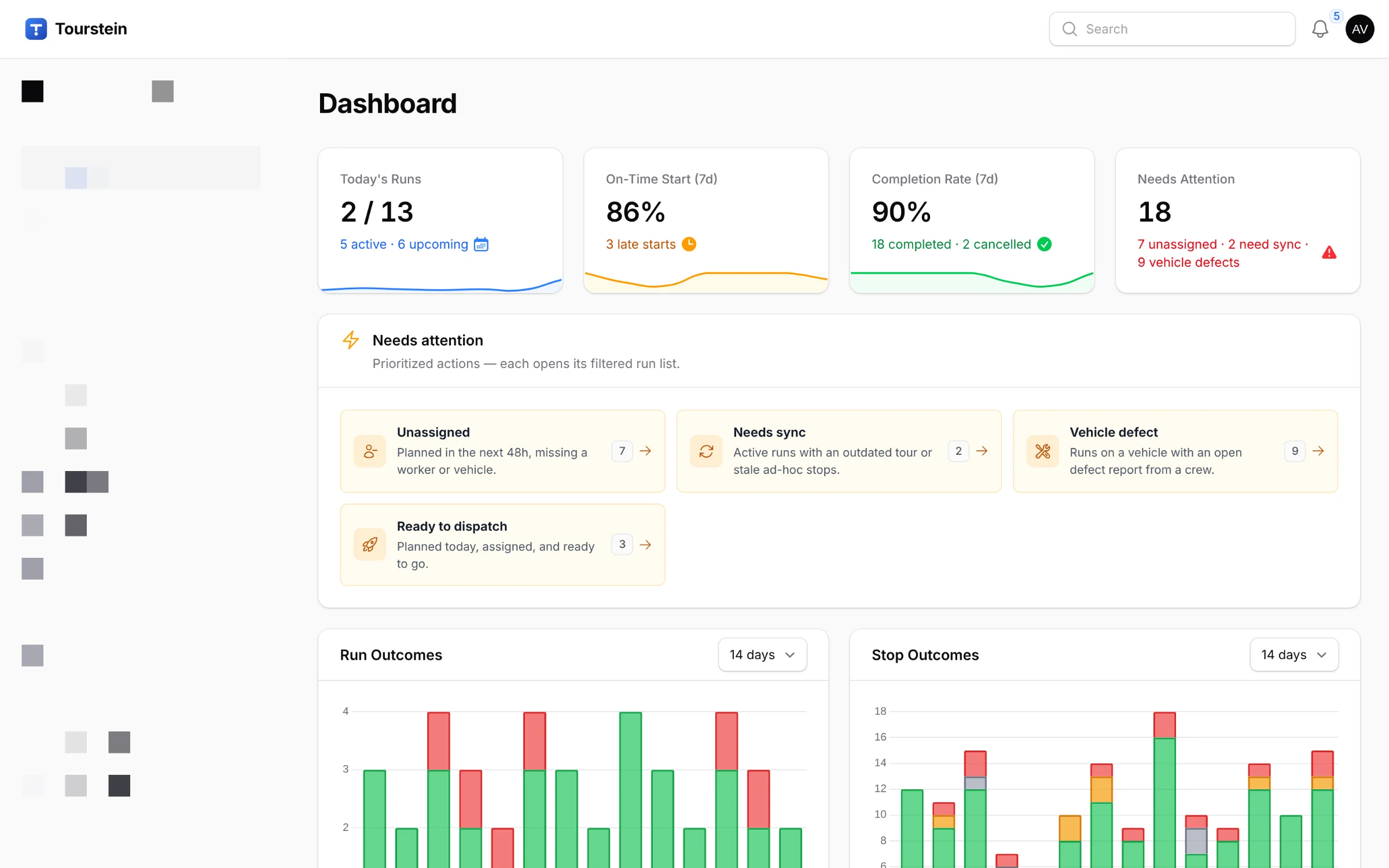
Tourstein operations dashboard: today's runs, on-time start and completion KPIs, a needs-attention queue that includes vehicle defects, and charts of run and stop outcomes

REAL PRODUCT SCREENS · DEMO WORKSPACE DATA

Built for the work

For work that runs in rounds

Fixed sites, repeat visits, small crews, tight time windows, and clients who want proof of the work. Tourstein is built for exactly that. Two examples it knows well:

Snow removal

Snow and ice don't wait for office hours. Plan clearing tours for your sites, send out plows and spreaders from your depots, and keep access roads open before the day starts. The snow removal app logs every run with times, GPS, and photos, no paper logbook needed.

Snow clearingDe-icingSweeping
More on the snow removal app (in German) →
Commercial cleaning

Regular cleaning rounds across offices, retail, logistics, and healthcare sites. The same tours, dispatching, and proof of service, season after season. Software for cleaning businesses that look after fixed sites on a schedule.

OfficeRetailLogisticsHealthcare
More on the cleaning software (in German) →

A different trade? You define your own service types, site categories, and plans. Planning, dispatch, and proof work the same.

Stop 01 · Import

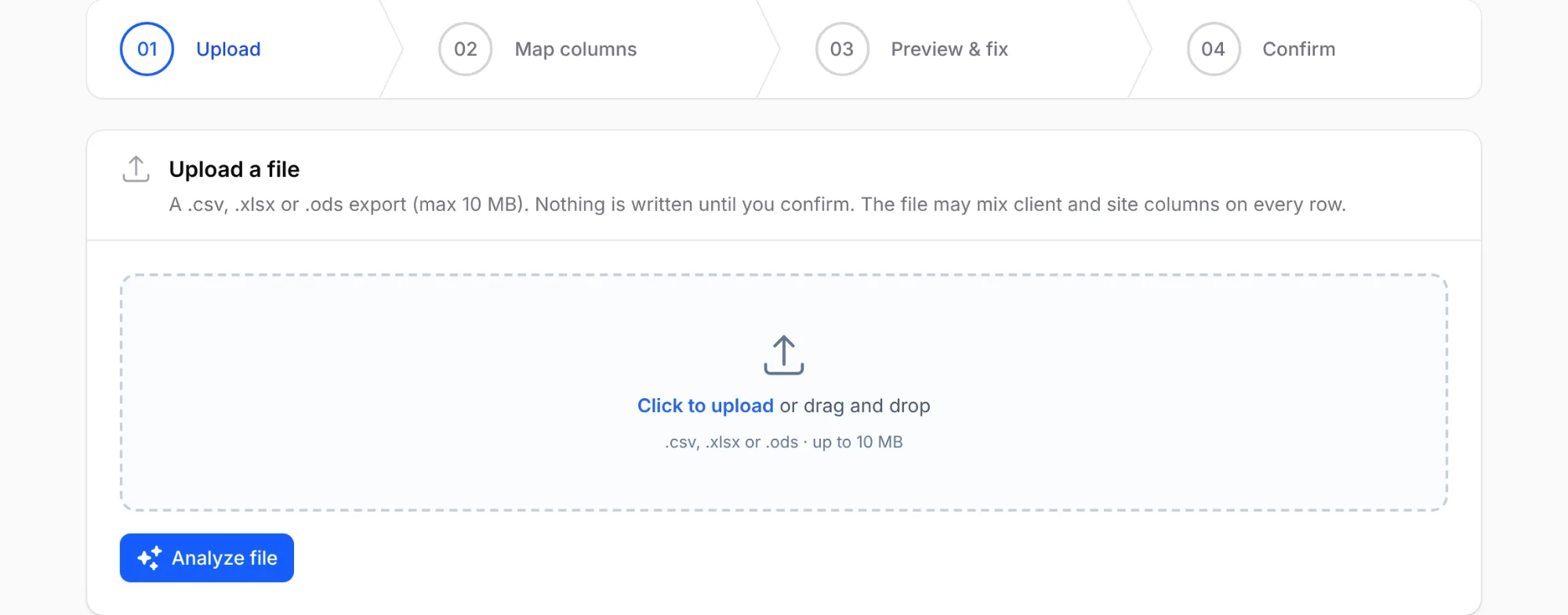
Your client list is already in a spreadsheet. Good.

Upload the export from your old system. Any columns, any order. Match each column to a Tourstein field and check every row before anything is saved.

  • Imports CSV, XLSX, and ODS files and detects the format for you
  • Match columns to client or site fields, skip the ones you don't need
  • The preview shows what each row will do: create, update, or skip. Importing twice never creates duplicates
Import wizard upload step: drag-and-drop a CSV, XLSX, or ODS export, with the four steps ahead: upload, map columns, preview and fix, confirm

Stop 02 · Service areas

Draw the work, not just the address

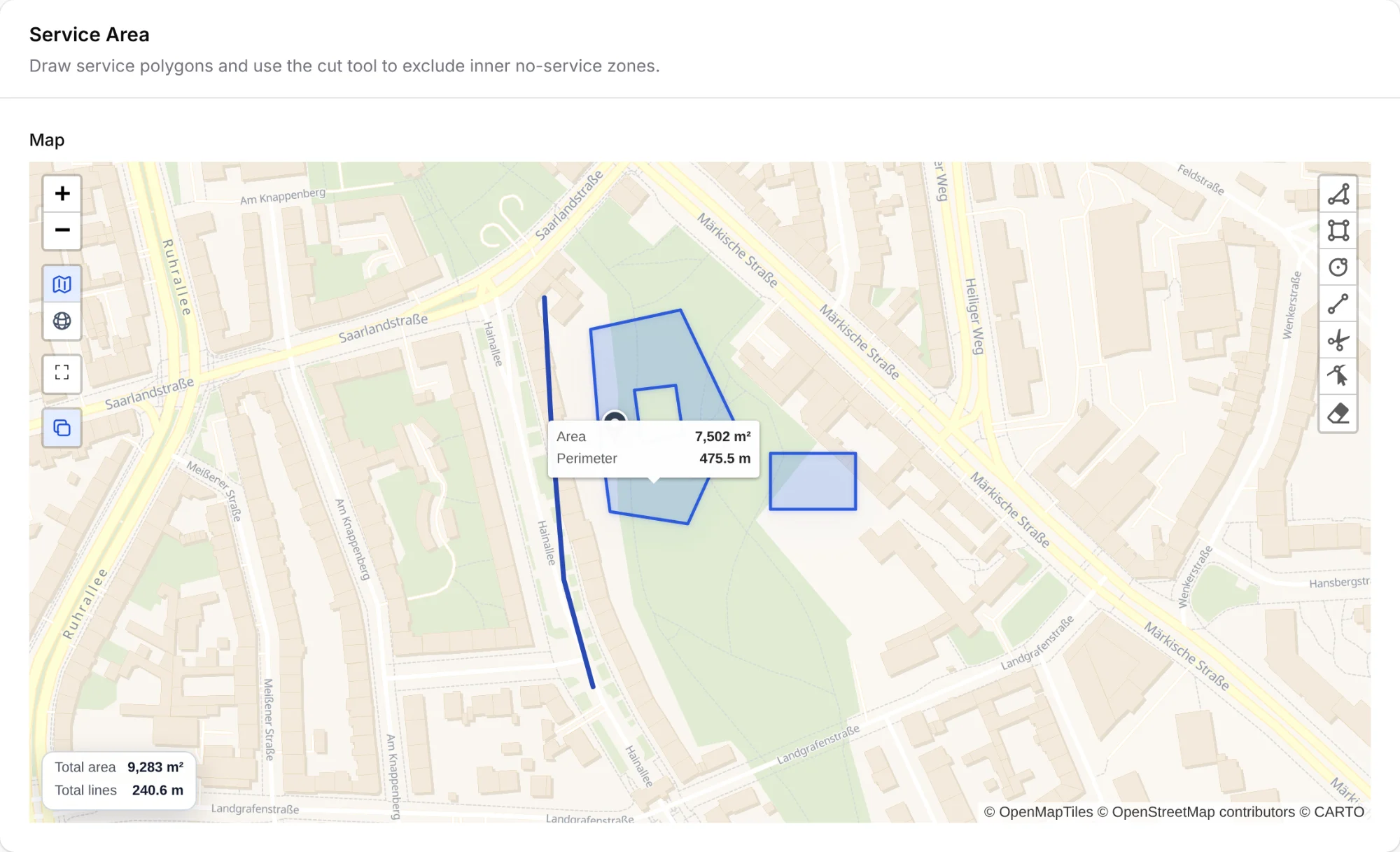
Every site has service plans: what to do, and exactly where. Draw the area right on the map, whether it's a parking deck, a plaza, or an access road. Cut out the zones that must stay untouched.

  • Draw areas with holes for the parts to leave alone, and lines for paths and roads
  • Area, perimeter, and line lengths are measured as you draw, with totals for the whole plan
  • Service types per plan: snow clearing, de-icing, sweeping, or your own
  • Workers see the same areas on their stop map in the field
Service area editor with a drawn area that has a cut-out, a second area, and a treated path along the street, showing area and perimeter on hover, the plan's totals, and the drawing and cut tools

Stop 03 · Tour planning

Turn your whole site list into optimized tours

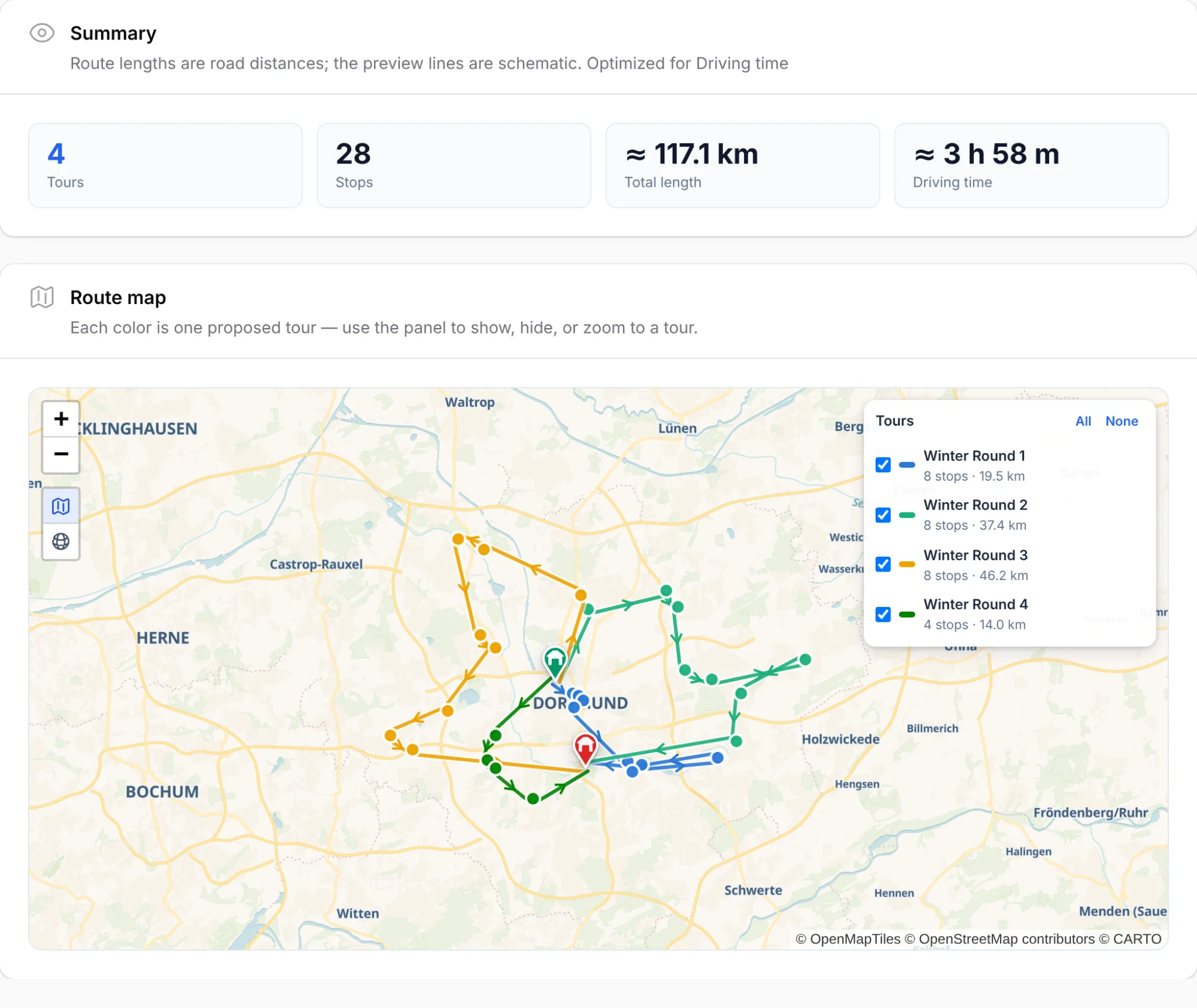
Tell the tour planner how many stops fit in a tour and which depots to start and end at. It splits your sites into tours, orders every stop along real roads, and shows driving time and distance before anything is created.

  • Plan many tours at once, grouped by site category or service type if you want
  • Optimize for driving time on the real road network, one-way streets included. Or for road distance, if you prefer
  • New site? Tourstein suggests the tour it fits best, ranked by the detour it adds
  • Generated tours are normal tours. Edit them, re-optimize them, dispatch them
Tour planner preview: four proposed tours drawn in color between two depots, with the total road distance and driving time and each tour's stops and kilometers
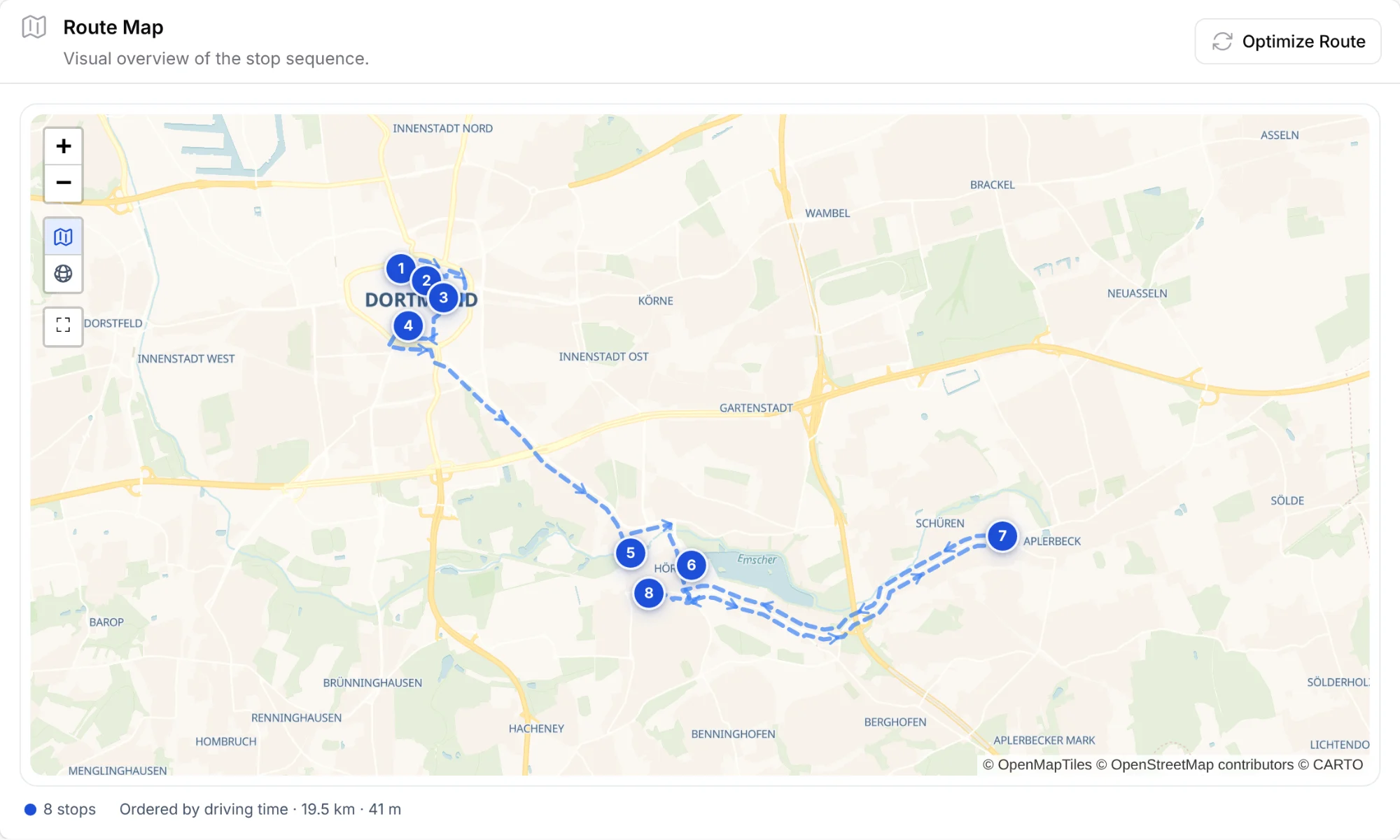
A tour's route map with eight numbered stops, the route drawn leg by leg along real roads with direction arrows, and the legend: ordered by driving time, 19.5 km, 41 minutes

Stop 04 · Dispatch

Put the right crew on tonight's runs

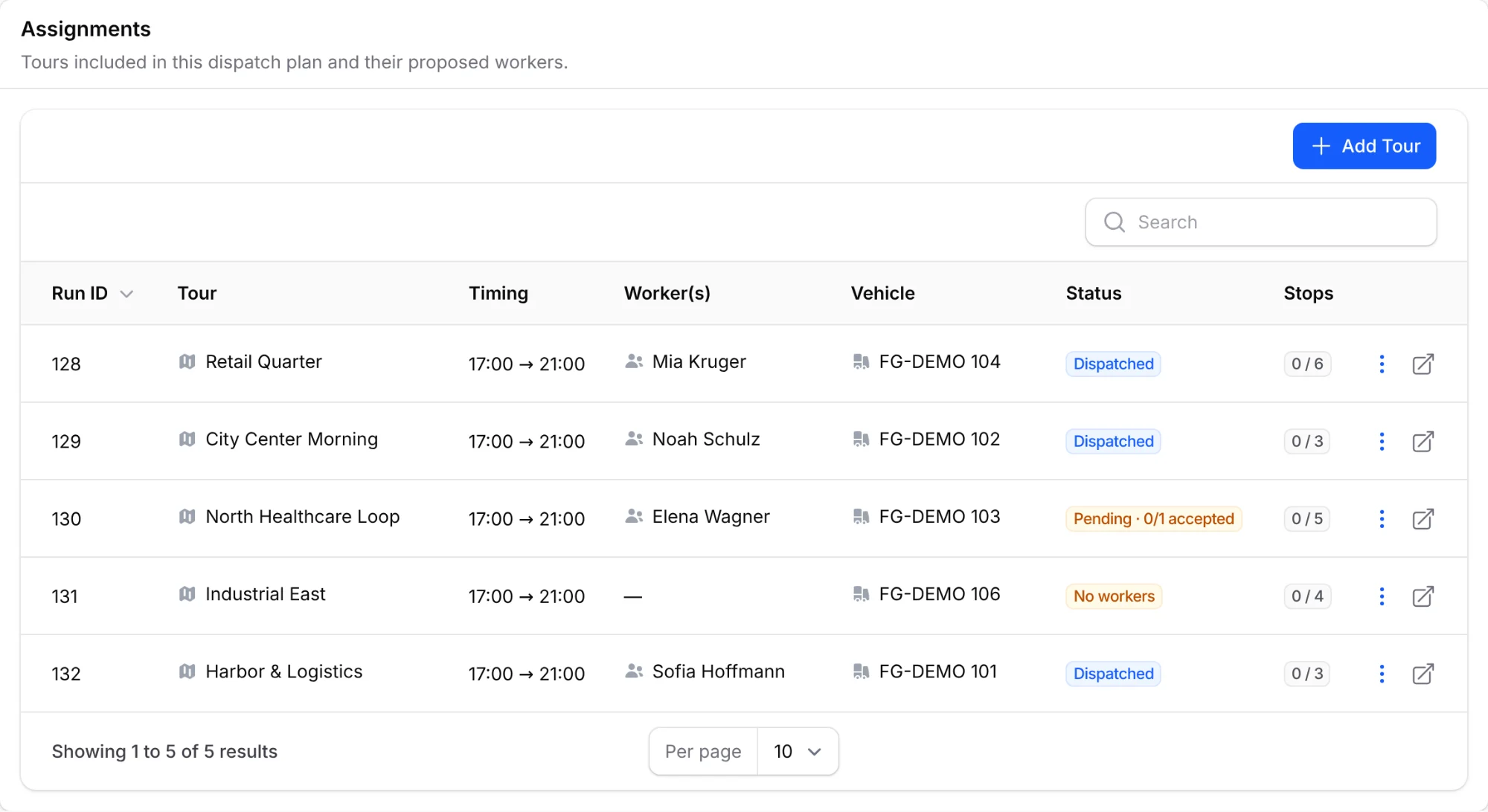
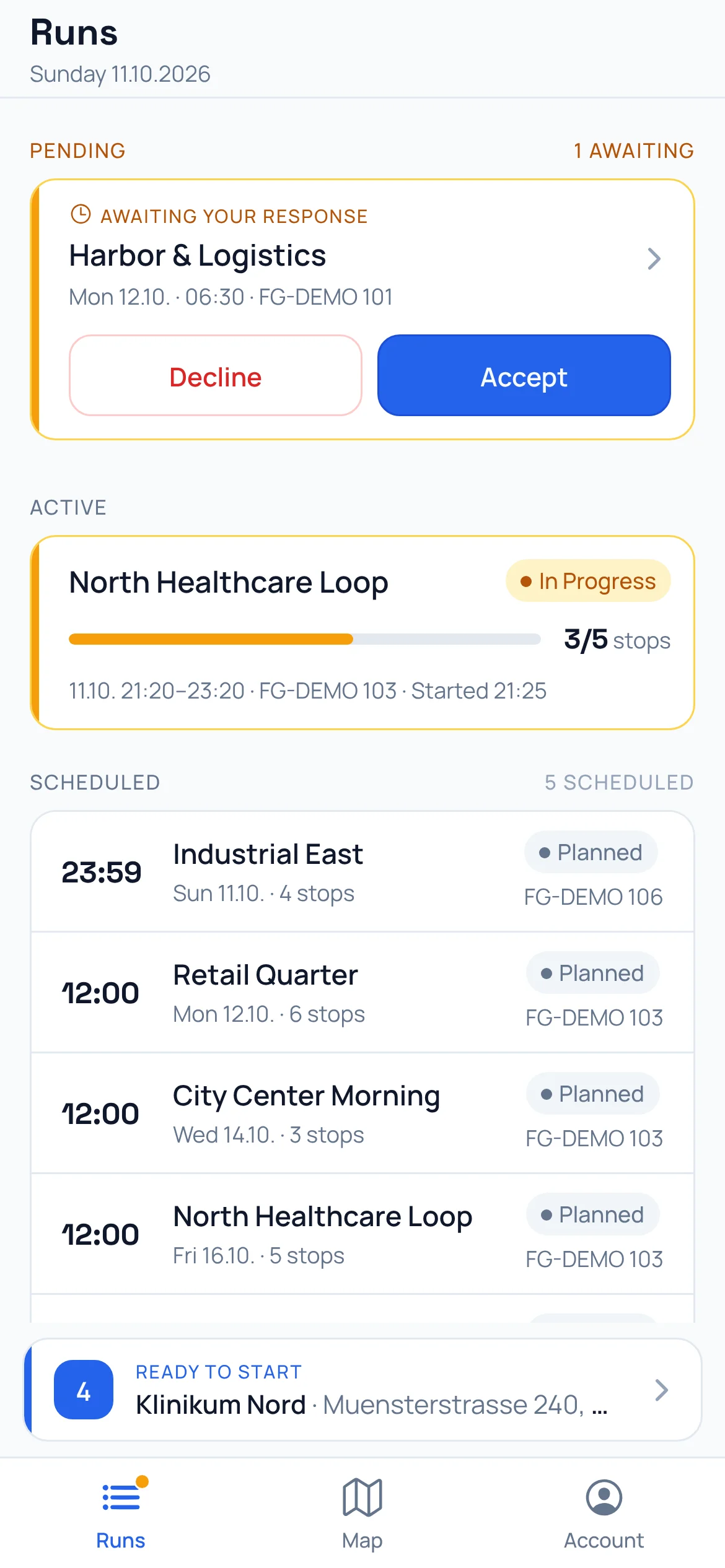
Build the plan for a shift: tours, crews, vehicles, and time windows. Publish it, and every worker finds their assignment in the app, ready to accept or decline.

  • Create a single run or a whole shift plan, and copy last week's plan in one click
  • Declining needs a reason, and you see every answer as it comes in
  • No double bookings: a worker or a vehicle never lands on two runs at the same time
Dispatch plan for an evening shift with five tours: three dispatched, one waiting for the worker's answer, and one declined and back without a worker
Worker app runs list with a new assignment to accept or decline, the active run with its progress, and the next scheduled runs

Stop 05 · Vehicle check

Every run starts at the depot, with a checked vehicle

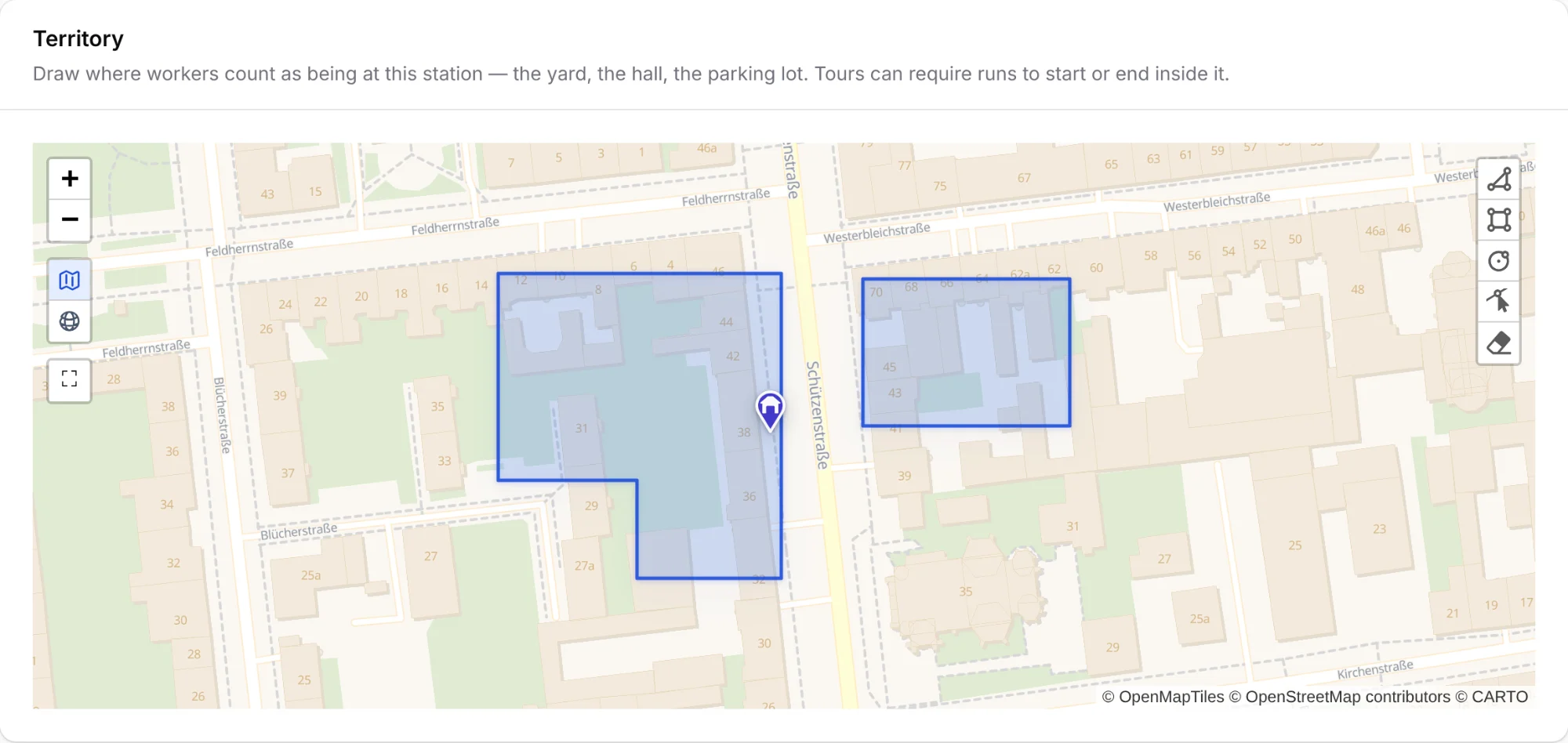
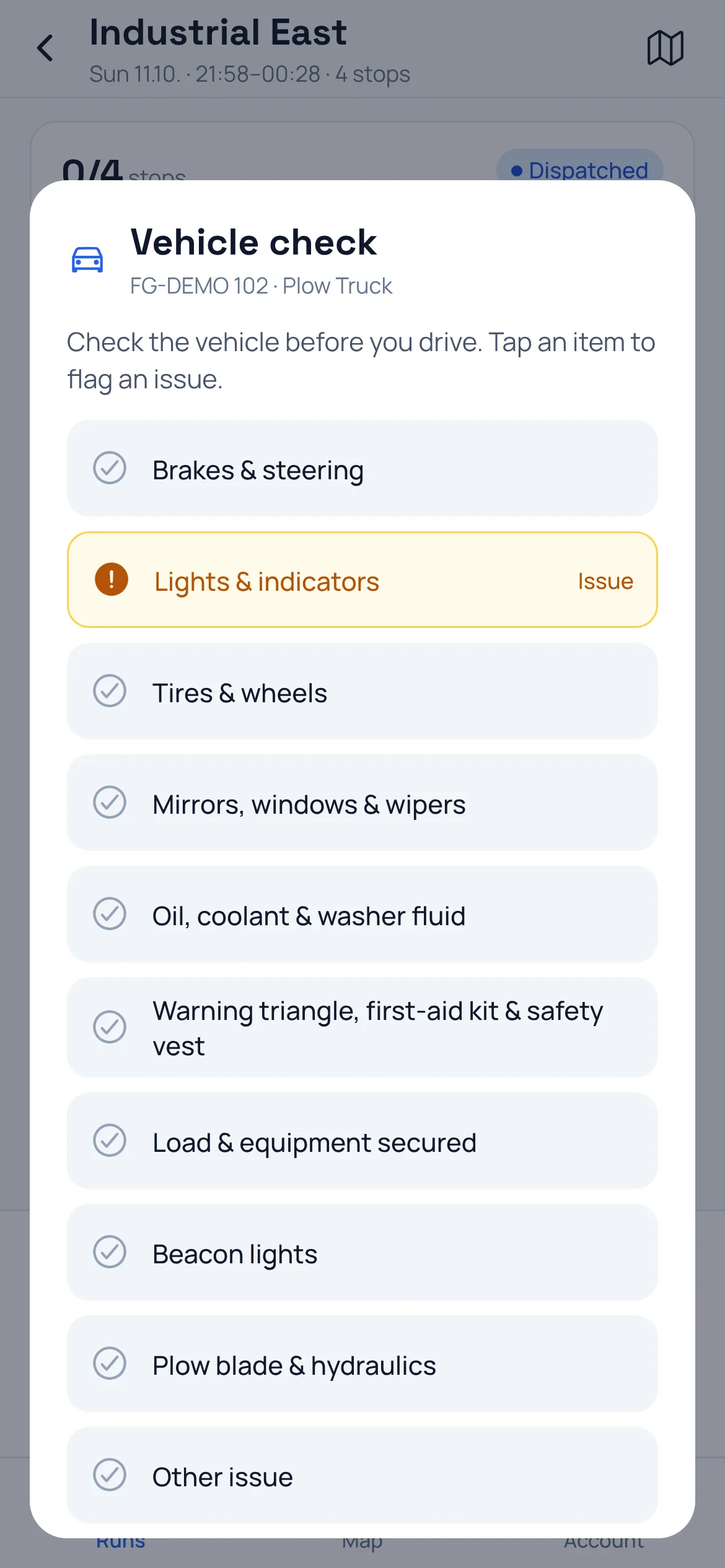
Draw the depot yard on the map once. Runs can then require a start and a finish inside it, confirmed by the worker's GPS. Before the first stop, the crew goes through the vehicle checklist in the app.

  • Geofenced depots: draw the yard, the hall, and the parking lot as the depot's territory
  • A run that must start or end at the depot can only be started or finished there. The app checks the location and the server enforces it
  • Your own pre-trip checklist per vehicle type. All OK is one tap, a flagged item needs a note and can carry photos
  • Reported defects show up on the dashboard and stay open until someone resolves them. Every check is kept on the vehicle's record
Depot territory editor: the depot yard and a parking lot across the street drawn as two shapes around the depot pin, with polygon, rectangle, and circle tools
Worker app vehicle check before the run starts: the plow truck's checklist with Lights and indicators flagged as an issue

Stop 06 · Worker app

An app that takes workers stop by stop

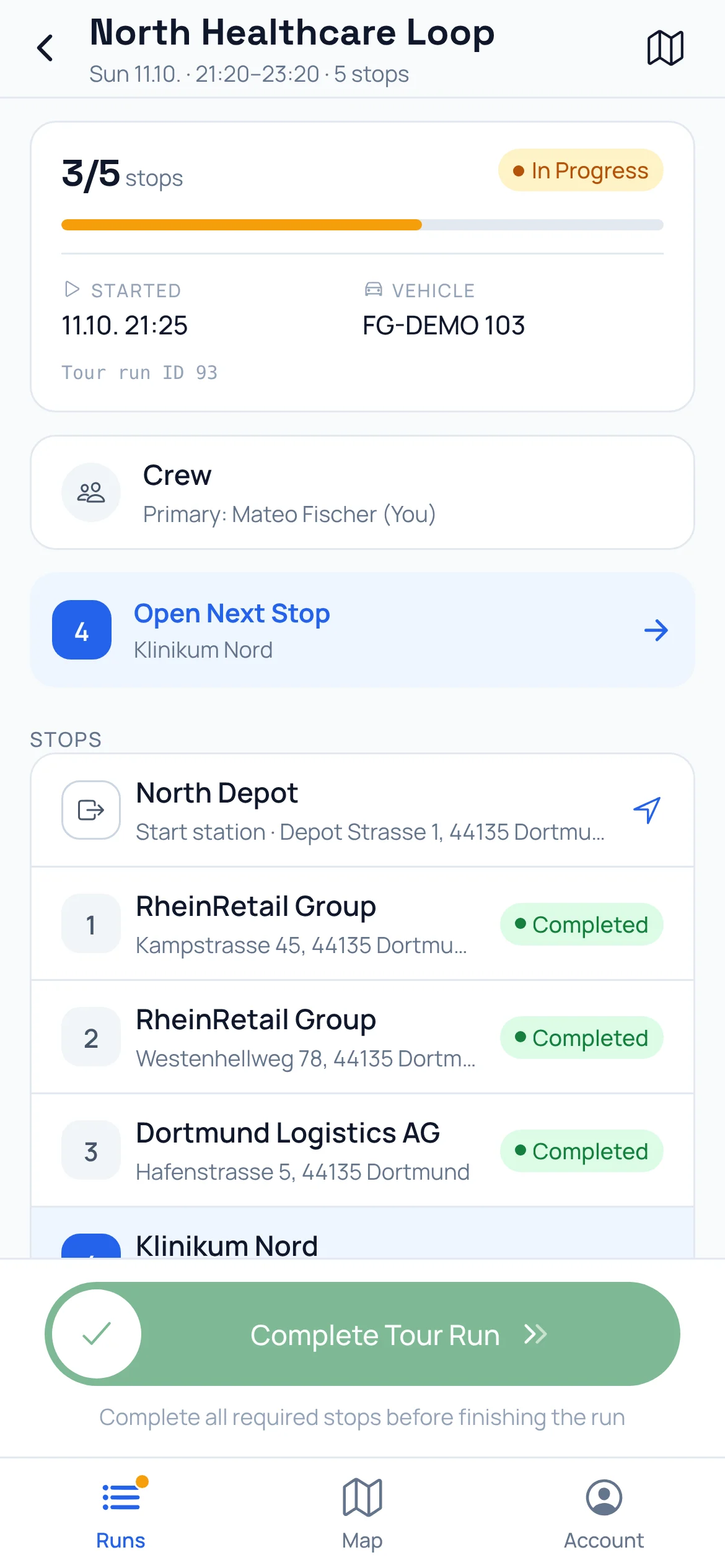
Workers sign in, see their runs, and work through the stops in order. Everything they need is one tap away: navigation, the site contact, the service plan. Starting a stop is a deliberate slide. No accidental taps in a moving truck.

  • Start → Complete → Report issue: the same clear steps at every stop
  • Record which services were done, like swept or gritted, with photos that upload the moment they're taken
  • After each stop, the next one is ready, one tap away from navigation
  • A map of the whole run, a warning when the tour changes mid-run, and the app in each worker's language
iOS Android
Worker app run screen with progress, vehicle, crew, the next stop, and the stop list from the start depot
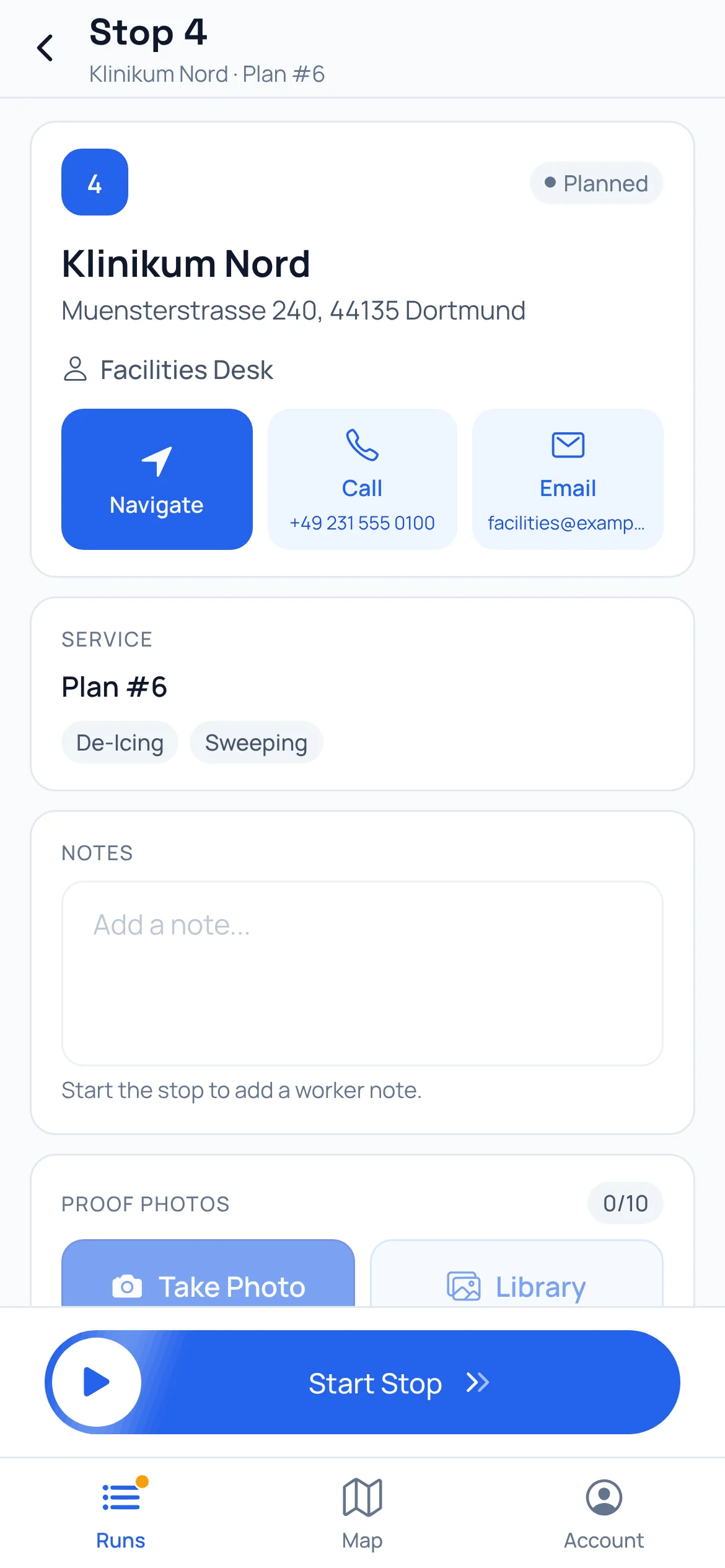
Worker app stop screen with navigate, call, and email buttons, the service plan, notes, proof photos, and a slide-to-start control
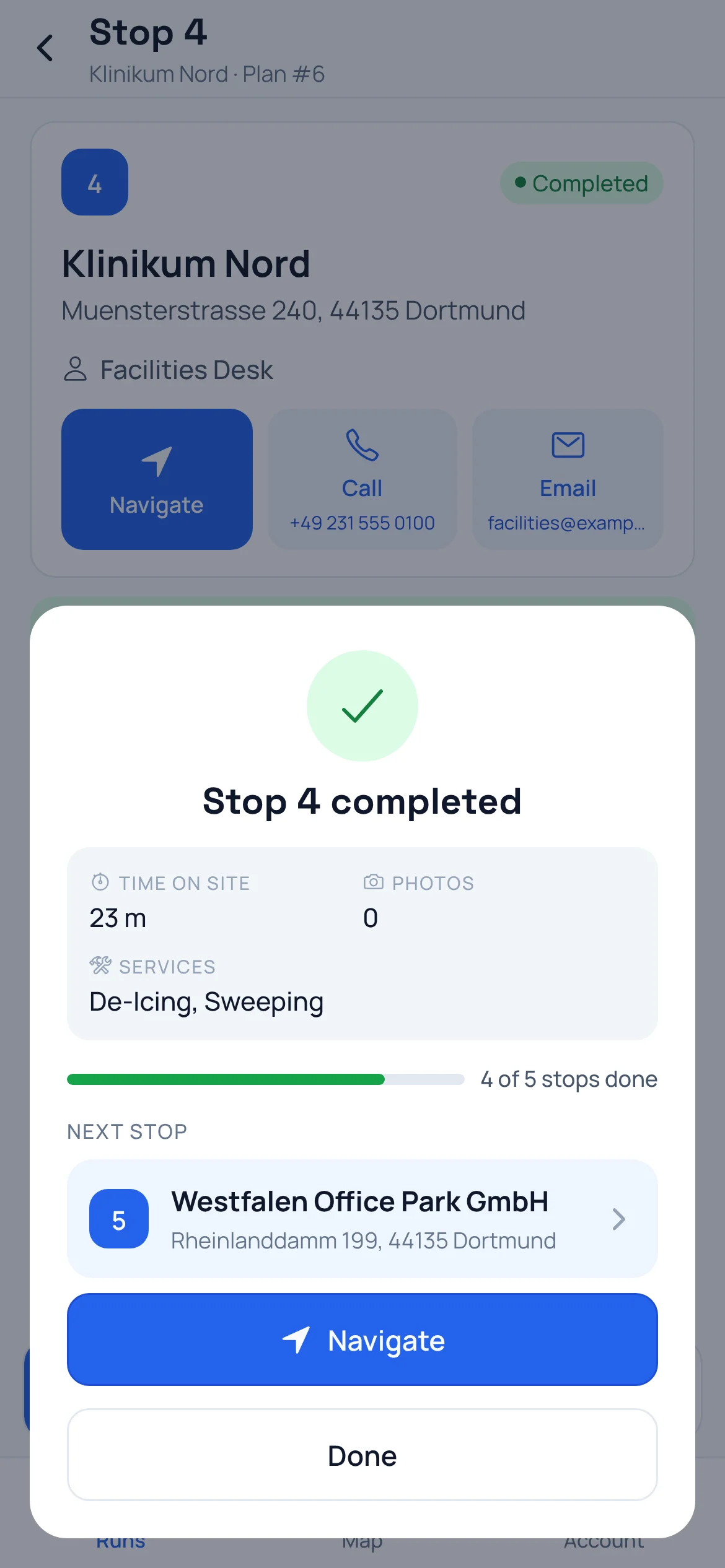
Stop completed: time on site, services performed, run progress, and the next stop with a Navigate button

Stop 07 · Live map

Every crew on one map, and who needs help

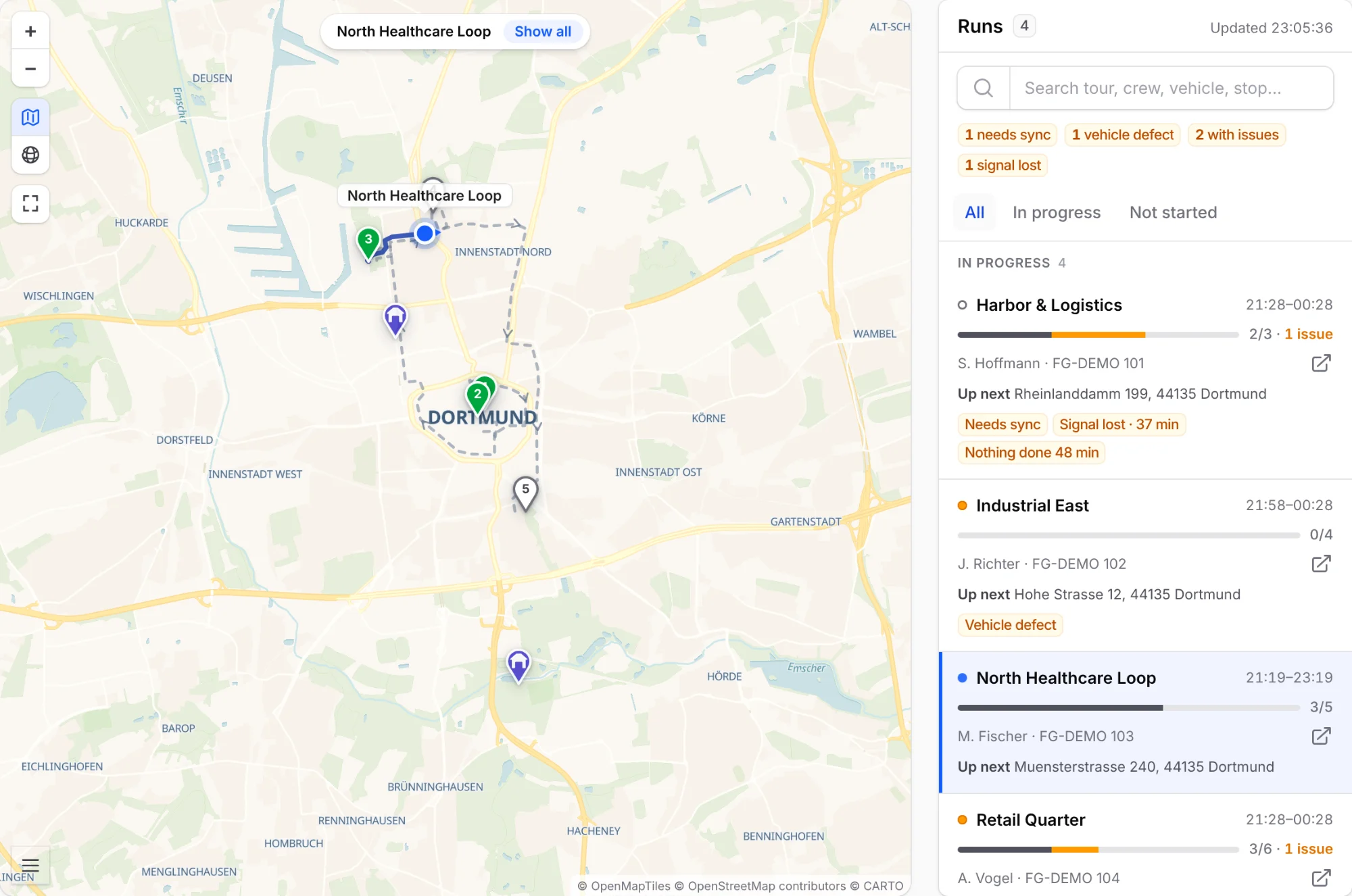
The live map shows every active run at its latest GPS position. The list beside it puts problems first: running late, signal lost, nothing done for a while, a vehicle defect.

  • Click a run to see the route it drove and the stops still ahead
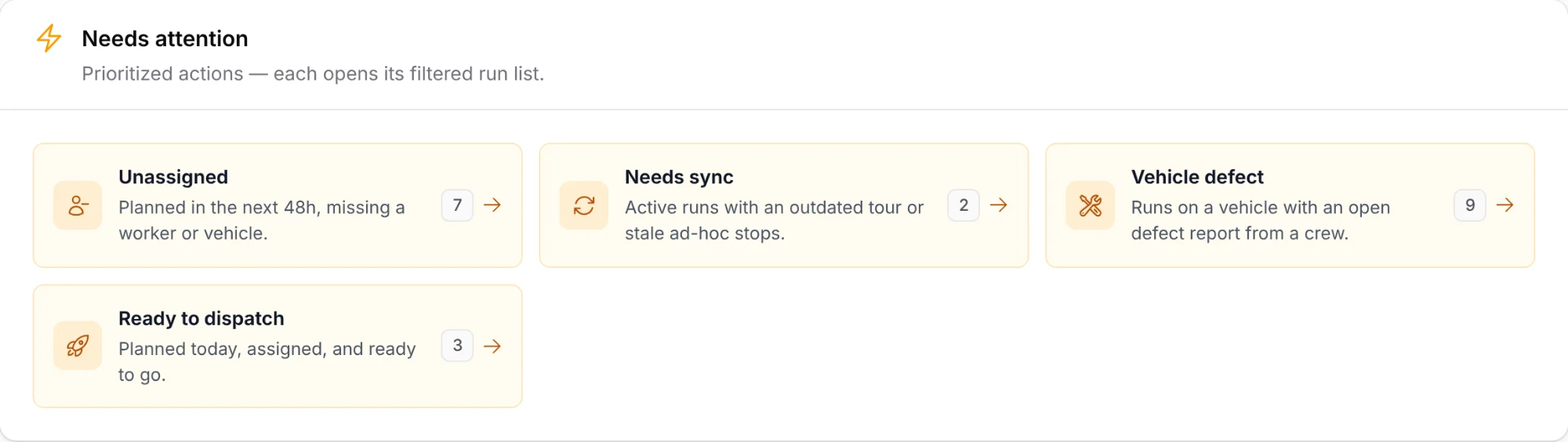
  • The dashboard lists what needs you: overdue starts, unassigned runs, outdated tours, vehicle defects
  • Location is only recorded while a run is in progress. Never after hours
Live map with four active runs: one run in focus with the route it drove and the planned route ahead, next to a list of runs flagged for a vehicle defect, lost signal, and an outdated tour
Needs-attention list: unassigned runs, runs that need a sync, runs on a vehicle with an open defect report, and runs ready to dispatch

Stop 08 · Proof of service

When the client calls, you have the record

Every run keeps its full history. The driven route from GPS next to the plan, times for every start and finish, the services done, photos from the field, and a result for every stop. For snow removal, that documents every clearing and gritting run in case a slip claim comes up. Our guide to snow removal records (in German) explains what counts if one does.

  • A printable service log per run, ready to hand to the client
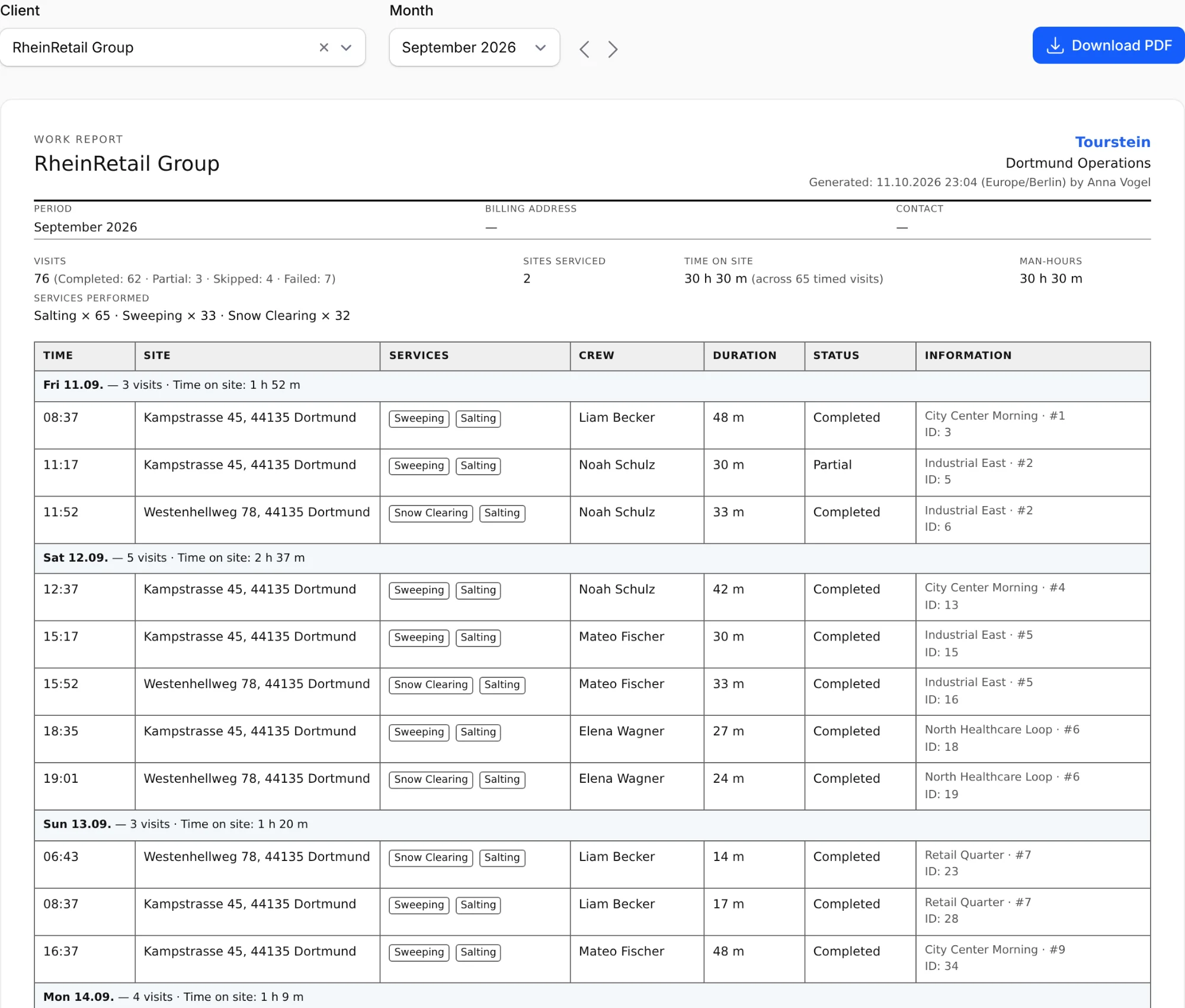
  • A monthly work report per client: every visit with times, services, crew, and time on site, as a PDF
  • Quality dashboards: on-time starts, completion rate, service issues by site
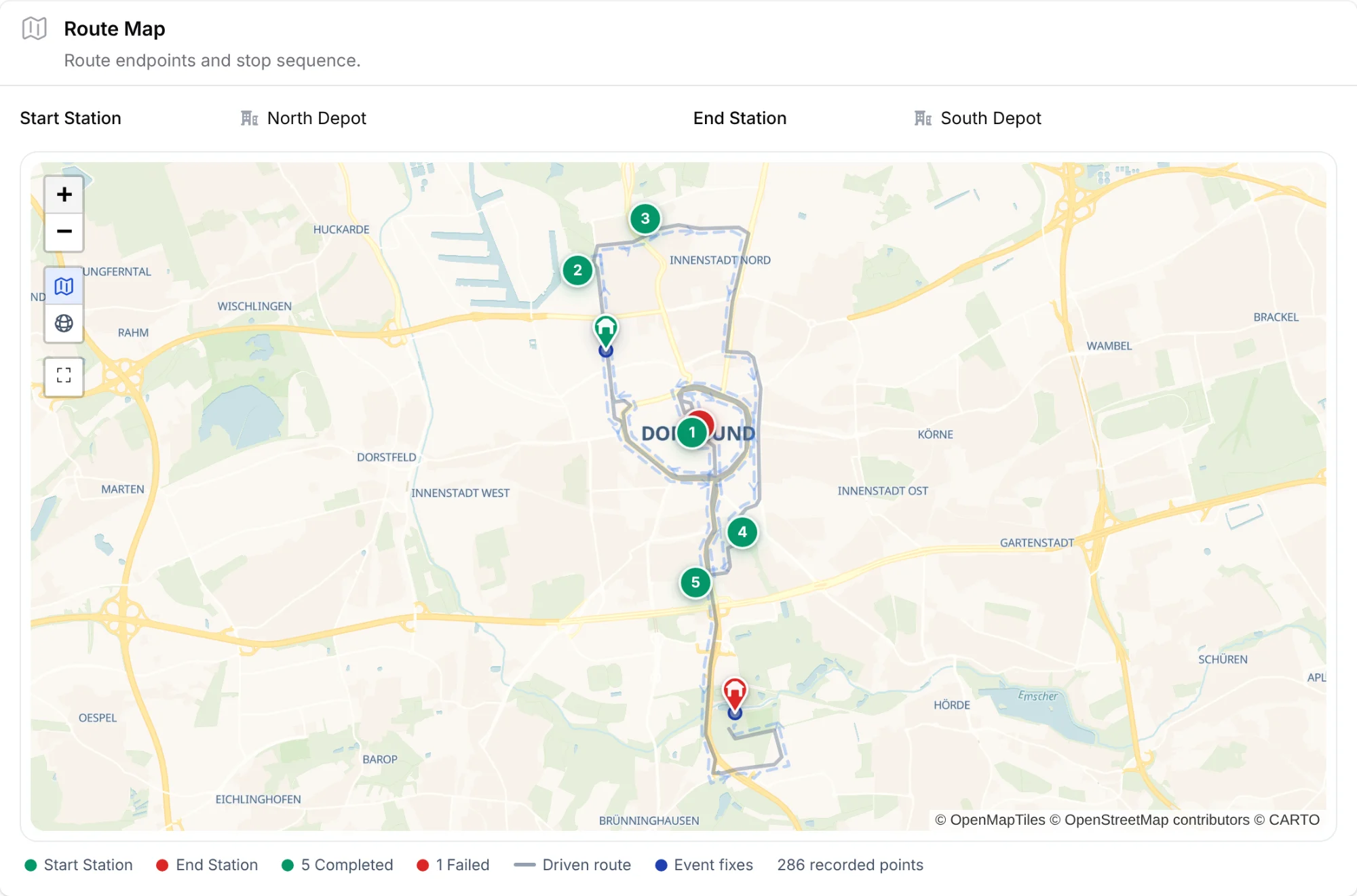
A completed run's route map: the GPS-recorded driven route over the planned route, five completed stops and one failed, start and end depots, and the recorded-points legend
Monthly work report for a client: visits, sites serviced, time on site, and services performed, then one row per visit with time, site, services, crew, duration, and status, with a Download PDF button

Stop 09 · Time tracking

Time tracking that fills itself in

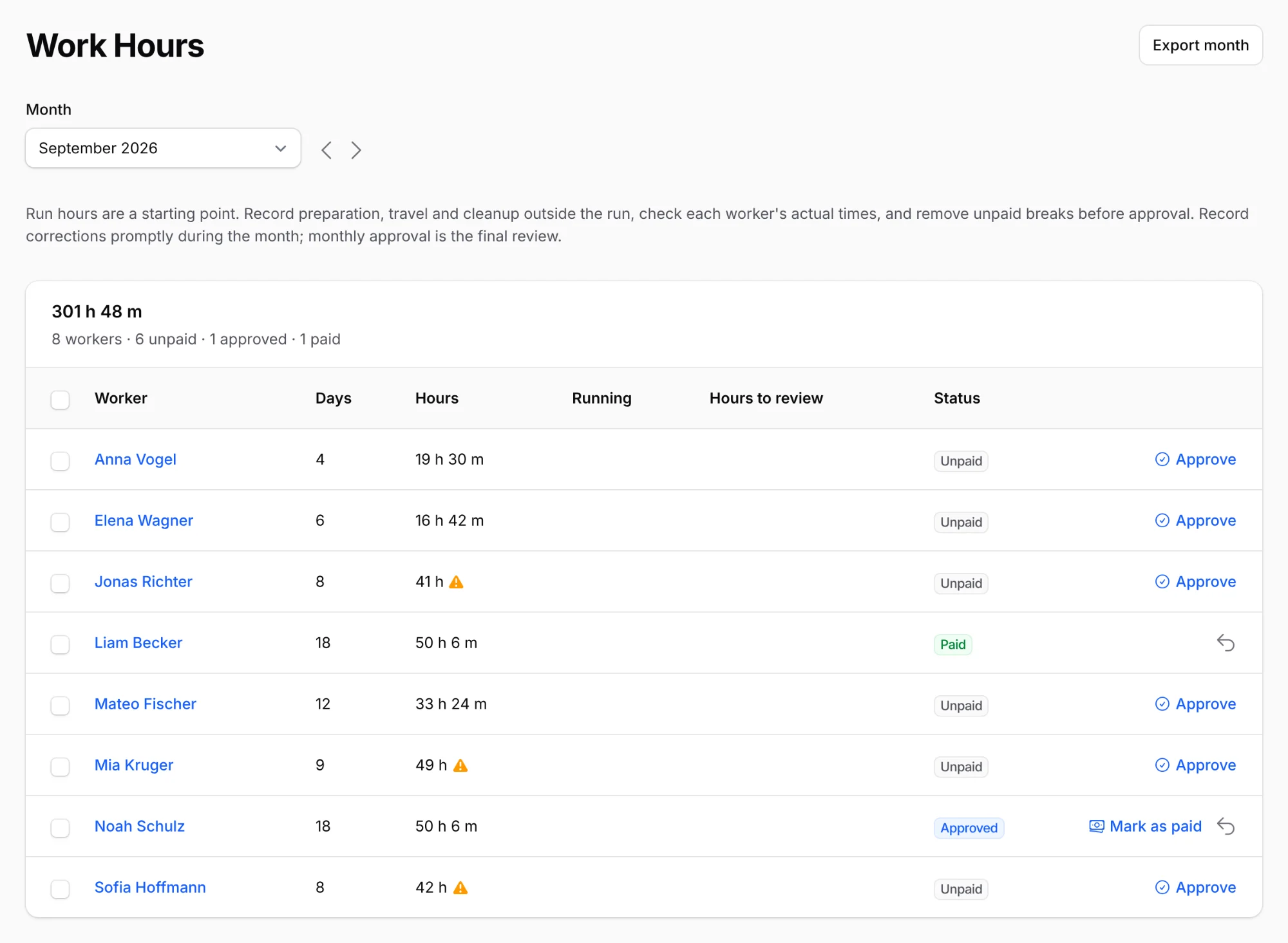
Every completed run turns into time entries for its crew. Add prep, standby, or workshop time by hand, review the month, and hand it to payroll.

  • A monthly overview per worker: days, hours, and pay status from open to approved to paid
  • Working-time checks flag days over 10 hours and missing breaks, following the German Working Hours Act
  • Every correction is kept in a change history, and the month exports for payroll
  • Workers see their own hours in the app
Work hours for a month: the total, then days, hours, working-time warnings, and pay status per worker, from open to approved to paid

Also in the box

Everything else is covered

The boring parts of running a service company are the ones that break first. Tourstein takes them seriously.

Enforce run requirements

Decide per tour what every run must deliver: photo proof, meter readings, a vehicle check, a start and finish at the depot. The app asks for each one, and the run does not move on without it.

Built for multiple locations

Each location is its own workspace. Teams, vehicles, tours, and clients stay where they belong, and the system enforces it.

Fleet & stations

Track vehicles by type and status, each with its own check and defect history. Depots are the start and end points of every tour.

Multi-language support

The dashboard and the worker app run in multiple languages. Each team member picks their own.

Roles & permissions

Set who can view, create, edit, and delete each kind of record. Everyone sees exactly what their role needs.

Built-in address search

Type an address and get the exact point on the map. Search and map previews are built in.

Pricing

One plan. Everything included.

You pay for the workers who were out on runs that month. Up to 500 sites and any number of office users are included, and a month without runs costs €15.

5
500

€59 per month, plus VAT

  • Up to 5 workers€59 flat
  • Workers 6 to 20€8 each
  • Workers 21 and up€5 each
  • Sites above 500€0.10 each
Try it free for 30 days
  • No credit card
  • Ends automatically
  • Cancel any month
  • No setup fee

Included

  • Tour planning on real roads, with route optimization
  • Dispatch that crews accept or decline in the app
  • Worker app for iOS and Android
  • Live map with GPS tracking during runs
  • Proof of service and a monthly work report per client
  • Time tracking with working-time checks and payroll export
  • Geofenced depots and pre-trip vehicle checks
  • Unlimited office users, tours, vehicles, and locations
  • Your first import and an onboarding call with us
  • Hosted in Germany, GDPR compliant

A month without runs: €15

If nobody was out on a run and no working hours were recorded, the month costs €15, automatically. Summer for your snow crews or a holiday shutdown: there's nothing to pause or switch off. Tours, sites, work reports, and GPS records stay available, even when a claim about January arrives in July.

Questions about pricing

Who counts as a field worker?

Everyone who was on at least one run in the calendar month, on their own or as part of a crew, and everyone whose working hours you record in Tourstein that month. Office users who only plan, dispatch, or report never count.

What counts as a site?

Every active site in your account, so every place your crews work. A site counts once, however often it's serviced, and deactivated or deleted sites don't count. We bill the highest daily count in the month.

Are there any other costs?

No. There's no setup fee and nothing sold as an add-on: the app, updates, and support are included. Only a custom data migration or a connection to another system is quoted separately.

Do we need GPS trackers or other hardware?

No. The worker app runs on your team's iOS or Android smartphones and records GPS only while a run is in progress. There are no trackers to buy or install.

What happens after the 30 days?

The trial covers the base plan, up to 5 workers and 500 sites, and ends on its own, so there is nothing to cancel. If you carry on, your workspace keeps running with everything you set up. If you don't, we delete it.

How does billing work?

Once a month, after it ends: €59 plus any workers or sites beyond what's included, or €15 for a month without runs. You can cancel at the end of any month. More than 100 field workers? We'll make you an offer.

All prices in euros, plus VAT. Tourstein is offered to businesses only.

End of route

Tomorrow's runs are waiting.

Tell us about your operation: sites, crews, season. We'll get back to you.

We use your details only to answer your message. See our privacy policy.

Message sent.

Thanks for reaching out. We'll get back to you shortly.